> ## Documentation Index
> Fetch the complete documentation index at: https://docs.silnahealth.com/llms.txt
> Use this file to discover all available pages before exploring further.
# Prior Authorization Overview
## How to get Prior Authorizations for a Patient Plan
1. You can get all prior authorizations for a patient plan by calling the [Get Prior Authorizations for a Patient Plan API](/api-reference/v1patientplanpriorauthorizationsresource/get-prior-authorizations-for-a-patient-plan).
2. This will return a preview of each prior authorization. In order to get more detailed information, you should call the [Get Prior Authorization API](/api-reference/v1priorauthorizationresource/get-prior-authorization) with one of the `id`s from the response above.
## Prior Authorization Statuses
When a prior authorization is in the below states, a provider/api client is still in the process of creating a prior authorizatin request
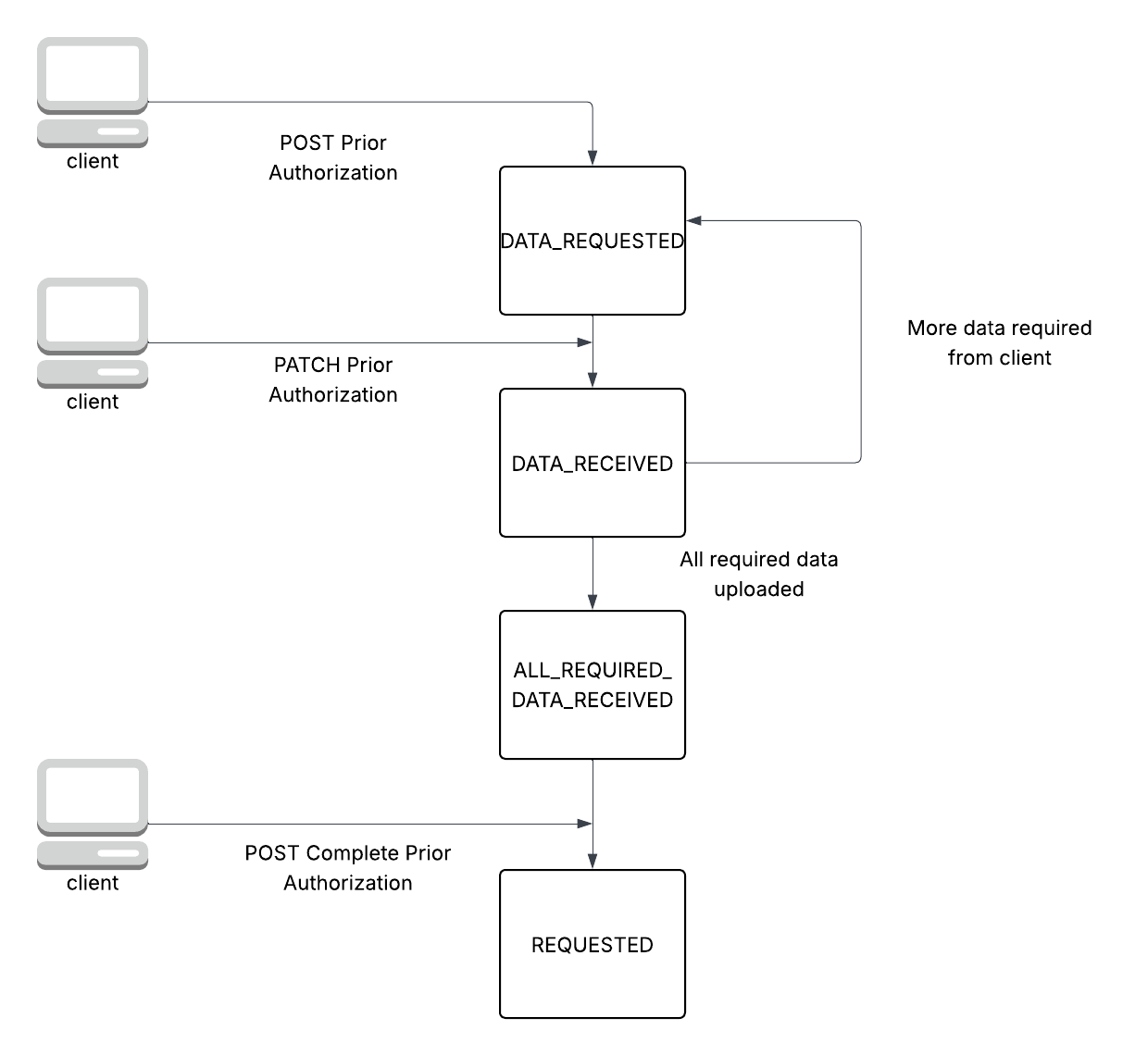
* `DATA_REQUESTED` -> This means that Silna is waiting for the provider to provide the required data. It is in this state after [Create Prior Authorization](/api-reference/v1priorauthorizationresource/create-prior-authorization)
* `DATA_RECEIVED` -> This means that Silna has received data from the provider and we are determining if the requirements have been met
* `ALL_REQUIRED_DATA_RECEIVED` -> This means that Silna has all required data from the provider and the provider can call [Complete Prior Authorization](/api-reference/v1priorauthorizationcompleterequestresource/complete-prior-authorization) to submit it to Silna to process
When a prior authorization is in the below states, Silna is currently processing the authorization:
* `AWAITING_SILNA`
* `SUBMITTED_TO_PAYOR`
* `PRELIMINARY_APPROVAL` -> This means the payor has provided preliminary approval but we are still waiting for either a reference number or an authorization approval letter.
* `REQUESTED`
* `PARTIALLY_APPROVED`
When a prior authorization is in the below states, a provider will have to take action:
* `PAYOR_DENIED`
* `PAYOR_DENIED_APPEALING`
* `AWAITING_PROVIDER`
When a prior authorization is in the below states, the prior authorization is in a terminal state:
* `PAYOR_APPROVED` -> This means that the prior authorization is complete.
* `DENIED_UNAPPEALED`
* `UNNECESSARY`
* `WITHDRAWN`
## Prior Authorization Document Types
### Document Types When Creating A Prior Authorization
#### All Specialty Document Types
* `PROGRESS_NOTE`
* `TREATMENT_PLAN_PLAN_OF_CARE` -> Use this document type for Treatment Plans or Plans of Care.
* `REFERRAL`
* `ASSESSMENT_EVALUATION`
* `DIAGNOSIS_REPORT`
* `AUTHORIZATION_FORM` -> This is required in very rare and complex cases. Usually clients will upload all required data
and we will use those inputs to create the authorization form.
#### ABA Specific Document Types
* `ABAS`
* `VINELAND`
* `SRS_2`
* `PDDBI`
* `PSI_SIPA`
### Document Types that we can return in Get Prior Authorization's other\_files field
In addition to the above document types, we can also return files with `OTHER` document types. This is a legacy document type
that we support for backwards compatibility purposes.
Note: This list of document types is not static. We will not remove document types but we will add more in the future.
## Authorization Types
When running a benefits check for a patient plan, we will tell you whether an authorization is required. The general
order of authorizations is the below:
1. `ASSESSMENT_AUTHORIZATION` -> (Not always required) Requests for initial evaluations or assessments. This is typically used for a new patient.
2. `INITIAL_AUTHORIZATION` -> Requests for initial treatment post-evaluation or assessment.
3. `CONCURRENT_AUTHORIZATION` -> Requests for ongoing treatment of existing patients.
* `AMENDMENT` -> Any addendums, extensions, or change of provider on an existing authorization.
## Reading Approval Data From a Prior Authorization
When a prior authorization is in the `PAYOR_APPROVED` state, then you can read the approval data from the prior authorization.
* The approval letter will be in `approval_files`. Please search for the file with the `document_type` of `APPROVAL_LETTER`.
This object will have file id. If you want to download it, then you will have to use the [Get File API](/api-reference/v1fileresource/get-file).
* The approved treatment codes will be in `approved_treatment_codes`. Each entry in this list will have a list of treatment codes that were approved (`treatment_codes`)
and the `units`, `unit_type`, `time_frame`, `reference_number`, `approved_start_date`, and `approved_end_date`. These fields will apply across all treatment\_codes in the `treatment_codes` list.
For example, if you have treatment codes 97153, 97154, and 97155 in the list, then `units=20` and `unit_type=VISITS`, then you have 20 visits approved across treatment codes 97153, 97154, and 97155 i.e. 97153.visits + 97154.visits + 97155.visits = 20.
All of these treatment codes will have the same start/end dates and reference numbers.
Below is an example of this kind of response:
```
...
"approved_treatment_codes": [
{
"treatment_codes": [
{
"code": "97153",
"description": "DESCRIPTION",
"standard": "CPT",
"treatment_code_modifiers": []
},
{
"code": "97154",
"description": "DESCRIPTION",
"standard": "CPT",
"treatment_code_modifiers": []
},
{
"code": "97155",
"description": "DESCRIPTION",
"standard": "CPT",
"treatment_code_modifiers": []
}
],
"units": "20",
"unit_type": "VISITS",
"time_frame": "TOTAL",
"reference_number": "123456789",
"approved_start_date": "2025-01-01",
"approved_end_date": "2025-06-01"
}
],
...
```
If instead, you have the below response, then you have 20 units approved for each treatment code i.e. 97153.visits = 20, 97154.visits = 20, 97155.visits = 20.
In this situation, it is also possible for reference numbers to be the same or different across each approved treatment code.
```
...
"approved_treatment_codes": [
{
"treatment_codes": [
{
"code": "97153",
"description": "DESCRIPTION",
"standard": "CPT",
"treatment_code_modifiers": []
}
],
"units": "20",
"unit_type": "VISITS",
"time_frame": "TOTAL",
"reference_number": "123456789",
"approved_start_date": "2025-01-01",
"approved_end_date": "2025-06-01"
},
{
"treatment_codes": [
{
"code": "97154",
"description": "DESCRIPTION",
"standard": "CPT",
"treatment_code_modifiers": []
}
],
"units": "20",
"unit_type": "VISITS",
"time_frame": "TOTAL",
"reference_number": "123456789",
"approved_start_date": "2025-01-01",
"approved_end_date": "2025-06-01"
},
{
"treatment_codes": [
{
"code": "97155",
"description": "DESCRIPTION",
"standard": "CPT",
"treatment_code_modifiers": []
}
],
"units": "20",
"unit_type": "VISITS",
"time_frame": "TOTAL",
"reference_number": "123456789",
"approved_start_date": "2025-01-01",
"approved_end_date": "2025-06-01"
}
],
...
```
## Creating A Prior Authorization
### Call Sequence
1. [POST (Create) Prior Authorization](/api-reference/v1priorauthorizationresource/create-prior-authorization). This returns a prior authorization id to use for the subsequent requests and tells the api client what data is required to complete the request
* This will return a Prior Authorization with status `DATA_REQUESTED`. It will return requirements to complete the prior authorization. Each requirement
marked with `"required": true` will need to be satisfied before completing the request.
2. [PATCH (Update) Prior Authorization](/api-reference/v1priorauthorizationresource/update-prior-authorization). Use this API to upload documents, treatment codes, clinician data, and/or a start date.
You can upload data that is not specifically required
3. Poll [GET Prior Authorization](/api-reference/v1priorauthorizationresource/get-prior-authorization). The client can stop polling once the status moves to `DATA_REQUESTED` or `ALL_REQUIRED_DATA_RECEIVED`. A Silna background job is responsible for moving a Prior Authorization status from `DATA_RECEIVED` to `DATA_REQUESTED` or `ALL_REQUIRED_DATA_RECEIVED`.
4. [PATCH (Update) Prior Authorization](/api-reference/v1priorauthorizationresource/update-prior-authorization) (if step 3 returns a prior authorization with status `DATA_REQUESTED` then this is required). Else, the client can call this with optional files. Once we are in the `ALL_REQUIRED_DATA_RECEIVED` state, clients will no longer be able to remove the uploaded data which is required.
5. [POST Prior Authorization Complete Request](/api-reference/v1priorauthorizationcompleterequestresource/complete-prior-authorization). This moves the prior authorization to the `REQUESTED` state.
### Lifecycle
 ### Kicking off the Prior Authorization Request Process (Step #1 in Call Sequence)
Calling [POST (Create) Prior Authorization](/api-reference/v1priorauthorizationresource/create-prior-authorization) will create a Prior Authorization in a `DATA_REQUESTED` state and return what additional data is required
* You will need to supply three fields: a `patient_plan_id`, an `authorization_type`, and a `specialty`.
* When `treatement_codes.required` is `true` then the api client will need to use the [PATCH (Update) Prior Authorization](/api-reference/v1priorauthorizationresource/update-prior-authorization) to create at least one treatment code. The reason we require an additional request to upload treatment codes is because there are multiple treatment code standards (depending on the payor) and we need to let the api client know which one to use.
* When `documents.required` is `true`, then the api client will need to use the [PATCH (Update) Prior Authorization](/api-reference/v1priorauthorizationresource/update-prior-authorization) api to upload the required documents (and optionally the documents with `required` set to `false`). Similar to treatment codes, we are unable to know which documents are required until the api client initiates the creation of a prior authorization as the documents required depend on the payor, specialty, and authorization type.
* When uploading documents, you will first need to upload the file with the [POST (Upload) File API](/api-reference/v1fileresource/upload-file) and then use the file id in the [PATCH (Update) Prior Authorization](/api-reference/v1priorauthorizationresource/update-prior-authorization) api to upload the document.
* Each item in `documents.items` will have a `document_type` and a `required` field. The `document_type` tells you what document type you need to upload and the `required` flag tells you whether that specific document is required.
* When `clinician_npi.required` is `true`, then the api client will need to use the [PATCH (Update) Prior Authorization](/api-reference/v1priorauthorizationresource/update-prior-authorization) to upload a clinician NPI (and optionally first and last name).
* When `start_date.required` is `true`, then the api client will need to use the PATCH Prior Authorization API to add a start date to the authorization.
### Updating A Prior Authorization Request (Step #2 and Step #4 in Call Sequence)
Calling [PATCH (Update) Prior Authorization](/api-reference/v1priorauthorizationresource/update-prior-authorization) allows
a client to complete the requirements returned by the [POST (Create) Prior Authorization](/api-reference/v1priorauthorizationresource/create-prior-authorization) API.
Updates to list fields will replace the entire list. If you need to make a subsequent update, you should first call [GET Prior Authorization](/api-reference/v1priorauthorizationresource/get-prior-authorization) to get the current requested treatment codes and documents on file.
Making calls to this API with additional data fields (like treatment codes, clinician\_npi, documents, start\_date) will move the status to `DATA_RECEIVED`.
From there, Silna will determine whether the requirements have been met. If so, we move the state to `ALL_REQUIRED_DATA_RECEIVED`. If not all requirements have
been satisfied, then we move to `DATA_REQUESTED` and return the requirements that are still needed.
Once the status is `ALL_REQUIRED_DATA_RECEIVED`, the client can still add more documents, treatment codes and make changes to the clinician and start date. However,
they cannot take any action that would move the prior authorization status back to `DATA_REQUESTED`. For example, if there is already a start date on the prior authorization, then the client cannot remove it. If they want to change the start date, they will need to update it to a new date.
Passing in `save_as_draft = True` as an argument to the Prior Authorization Patch will leave the status of the prior authorization unchanged.
### Viewing Which Prior Authorization Requirements Have Been Satisfied (Step #3 in Call Sequence)
Poll [GET Prior Authorization](/api-reference/v1priorauthorizationresource/get-prior-authorization) with the query parameter `with_requirements=true` to
see the same requirements as the [POST (Create) Prior Authorization](/api-reference/v1priorauthorizationresource/create-prior-authorization) API. This
will also return a `requirement_satisfied` field which returns whether that individual requirement has been met. Use the `status` field to determine if
ALL requirments have been met
### Completing the Prior Authorization Request (Step #5 in Call Sequence)
Calling [POST Prior Authorization Complete Request](/api-reference/v1priorauthorizationcompleterequestresource/complete-prior-authorization) will move the prior authorization to the `REQUESTED` state.
This will only return a 2XX response code if the prior authorization has status `ALL_REQUIRED_DATA_RECEIVED`, else it will return a 4XX error.
### Aborting the Prior Authorization Request
If you no longer want to submit a prior authorization, you can use the [DELETE (Abort) Prior Authorization](/api-reference/v1priorauthorizationresource/abort-prior-authorization) API.
Note: You cannot delete a prior authorization that is not in the `ALL_REQUIRED_DATA_RECEIVED`, `DATA_REQUESTED`, or `DATA_RECEIVED` states.
## Document Validation
Silna optionally supports validating uploaded clinical documentation before a prior authorization is submitted. Document Validation analyzes documents against both payor-managed rules and provider-configured rules (set up in the Automation tab in Provider Overview) to catch issues like missing signatures, expired documents, and mismatched diagnosis codes.
Validation runs automatically when you upload documents during a [PATCH (Update) Prior Authorization](/api-reference/v1priorauthorizationresource/update-prior-authorization) request and typically completes in **30 to 45 seconds**. Results are available via `required_data.documents[].document_validation_batch` when polling with `with_requirements=true`. Use the `document_validation_batch.id` to fetch detailed rule results from the [batch endpoints](/api-reference/v1documentvalidationbatchresource/get-document-validation-batch). If validation fails, the PA will move to `DATA_REQUESTED` with details about which rules failed — but this does not prevent you from moving forward with creating the prior authorization. You can fix and re-upload documents, or choose to proceed by disabling validation for specific document types or setting `skip_document_intelligence: true` on your next PATCH request.
The `document_validation` field on the GET Prior Authorization response is **deprecated**. It only returns a single document validation and does not reflect the full batch. Use `document_validation_batch` instead.
For the full guide - including rule types, lifecycle diagrams, detailed result schemas, and override instructions - see the **[Document Validation Overview](/api-reference/v1documentvalidationresource/overview)**.
## Syncing Approved Authorizations
We support syncing approved authorizations, allowing Silna to be your source of truth for all authorization information.
* The [Create Completed Authorization](api-reference/v1priorauthorizationcompletedresource/create-completed-prior-authorization) allows
you to create an authorization in the PAYOR\_APPROVED state in Silna.
* The [Sync Approved Authorization](api-reference/v1priorauthorizationsyncapprovalresource/sync-approval-for-prior-authorization) allows
you to update an existing prior authorization in Silna to be in the `PAYOR_APPROVED` state. A common use case for this API would be
when a payor contacts you directly about an authorization approval and you want to let Silna know that this authorization has been approved.
## Other Caveats
When creating a prior authorization through the API, we strongly recommend you upload fresh files i.e. you do not use files that you previously entered as part of a previous authorization request.
### Kicking off the Prior Authorization Request Process (Step #1 in Call Sequence)
Calling [POST (Create) Prior Authorization](/api-reference/v1priorauthorizationresource/create-prior-authorization) will create a Prior Authorization in a `DATA_REQUESTED` state and return what additional data is required
* You will need to supply three fields: a `patient_plan_id`, an `authorization_type`, and a `specialty`.
* When `treatement_codes.required` is `true` then the api client will need to use the [PATCH (Update) Prior Authorization](/api-reference/v1priorauthorizationresource/update-prior-authorization) to create at least one treatment code. The reason we require an additional request to upload treatment codes is because there are multiple treatment code standards (depending on the payor) and we need to let the api client know which one to use.
* When `documents.required` is `true`, then the api client will need to use the [PATCH (Update) Prior Authorization](/api-reference/v1priorauthorizationresource/update-prior-authorization) api to upload the required documents (and optionally the documents with `required` set to `false`). Similar to treatment codes, we are unable to know which documents are required until the api client initiates the creation of a prior authorization as the documents required depend on the payor, specialty, and authorization type.
* When uploading documents, you will first need to upload the file with the [POST (Upload) File API](/api-reference/v1fileresource/upload-file) and then use the file id in the [PATCH (Update) Prior Authorization](/api-reference/v1priorauthorizationresource/update-prior-authorization) api to upload the document.
* Each item in `documents.items` will have a `document_type` and a `required` field. The `document_type` tells you what document type you need to upload and the `required` flag tells you whether that specific document is required.
* When `clinician_npi.required` is `true`, then the api client will need to use the [PATCH (Update) Prior Authorization](/api-reference/v1priorauthorizationresource/update-prior-authorization) to upload a clinician NPI (and optionally first and last name).
* When `start_date.required` is `true`, then the api client will need to use the PATCH Prior Authorization API to add a start date to the authorization.
### Updating A Prior Authorization Request (Step #2 and Step #4 in Call Sequence)
Calling [PATCH (Update) Prior Authorization](/api-reference/v1priorauthorizationresource/update-prior-authorization) allows
a client to complete the requirements returned by the [POST (Create) Prior Authorization](/api-reference/v1priorauthorizationresource/create-prior-authorization) API.
Updates to list fields will replace the entire list. If you need to make a subsequent update, you should first call [GET Prior Authorization](/api-reference/v1priorauthorizationresource/get-prior-authorization) to get the current requested treatment codes and documents on file.
Making calls to this API with additional data fields (like treatment codes, clinician\_npi, documents, start\_date) will move the status to `DATA_RECEIVED`.
From there, Silna will determine whether the requirements have been met. If so, we move the state to `ALL_REQUIRED_DATA_RECEIVED`. If not all requirements have
been satisfied, then we move to `DATA_REQUESTED` and return the requirements that are still needed.
Once the status is `ALL_REQUIRED_DATA_RECEIVED`, the client can still add more documents, treatment codes and make changes to the clinician and start date. However,
they cannot take any action that would move the prior authorization status back to `DATA_REQUESTED`. For example, if there is already a start date on the prior authorization, then the client cannot remove it. If they want to change the start date, they will need to update it to a new date.
Passing in `save_as_draft = True` as an argument to the Prior Authorization Patch will leave the status of the prior authorization unchanged.
### Viewing Which Prior Authorization Requirements Have Been Satisfied (Step #3 in Call Sequence)
Poll [GET Prior Authorization](/api-reference/v1priorauthorizationresource/get-prior-authorization) with the query parameter `with_requirements=true` to
see the same requirements as the [POST (Create) Prior Authorization](/api-reference/v1priorauthorizationresource/create-prior-authorization) API. This
will also return a `requirement_satisfied` field which returns whether that individual requirement has been met. Use the `status` field to determine if
ALL requirments have been met
### Completing the Prior Authorization Request (Step #5 in Call Sequence)
Calling [POST Prior Authorization Complete Request](/api-reference/v1priorauthorizationcompleterequestresource/complete-prior-authorization) will move the prior authorization to the `REQUESTED` state.
This will only return a 2XX response code if the prior authorization has status `ALL_REQUIRED_DATA_RECEIVED`, else it will return a 4XX error.
### Aborting the Prior Authorization Request
If you no longer want to submit a prior authorization, you can use the [DELETE (Abort) Prior Authorization](/api-reference/v1priorauthorizationresource/abort-prior-authorization) API.
Note: You cannot delete a prior authorization that is not in the `ALL_REQUIRED_DATA_RECEIVED`, `DATA_REQUESTED`, or `DATA_RECEIVED` states.
## Document Validation
Silna optionally supports validating uploaded clinical documentation before a prior authorization is submitted. Document Validation analyzes documents against both payor-managed rules and provider-configured rules (set up in the Automation tab in Provider Overview) to catch issues like missing signatures, expired documents, and mismatched diagnosis codes.
Validation runs automatically when you upload documents during a [PATCH (Update) Prior Authorization](/api-reference/v1priorauthorizationresource/update-prior-authorization) request and typically completes in **30 to 45 seconds**. Results are available via `required_data.documents[].document_validation_batch` when polling with `with_requirements=true`. Use the `document_validation_batch.id` to fetch detailed rule results from the [batch endpoints](/api-reference/v1documentvalidationbatchresource/get-document-validation-batch). If validation fails, the PA will move to `DATA_REQUESTED` with details about which rules failed — but this does not prevent you from moving forward with creating the prior authorization. You can fix and re-upload documents, or choose to proceed by disabling validation for specific document types or setting `skip_document_intelligence: true` on your next PATCH request.
The `document_validation` field on the GET Prior Authorization response is **deprecated**. It only returns a single document validation and does not reflect the full batch. Use `document_validation_batch` instead.
For the full guide - including rule types, lifecycle diagrams, detailed result schemas, and override instructions - see the **[Document Validation Overview](/api-reference/v1documentvalidationresource/overview)**.
## Syncing Approved Authorizations
We support syncing approved authorizations, allowing Silna to be your source of truth for all authorization information.
* The [Create Completed Authorization](api-reference/v1priorauthorizationcompletedresource/create-completed-prior-authorization) allows
you to create an authorization in the PAYOR\_APPROVED state in Silna.
* The [Sync Approved Authorization](api-reference/v1priorauthorizationsyncapprovalresource/sync-approval-for-prior-authorization) allows
you to update an existing prior authorization in Silna to be in the `PAYOR_APPROVED` state. A common use case for this API would be
when a payor contacts you directly about an authorization approval and you want to let Silna know that this authorization has been approved.
## Other Caveats
When creating a prior authorization through the API, we strongly recommend you upload fresh files i.e. you do not use files that you previously entered as part of a previous authorization request.